Your PC at a glance
Your components, your internet and what you still need to turn on to get the most out of it.
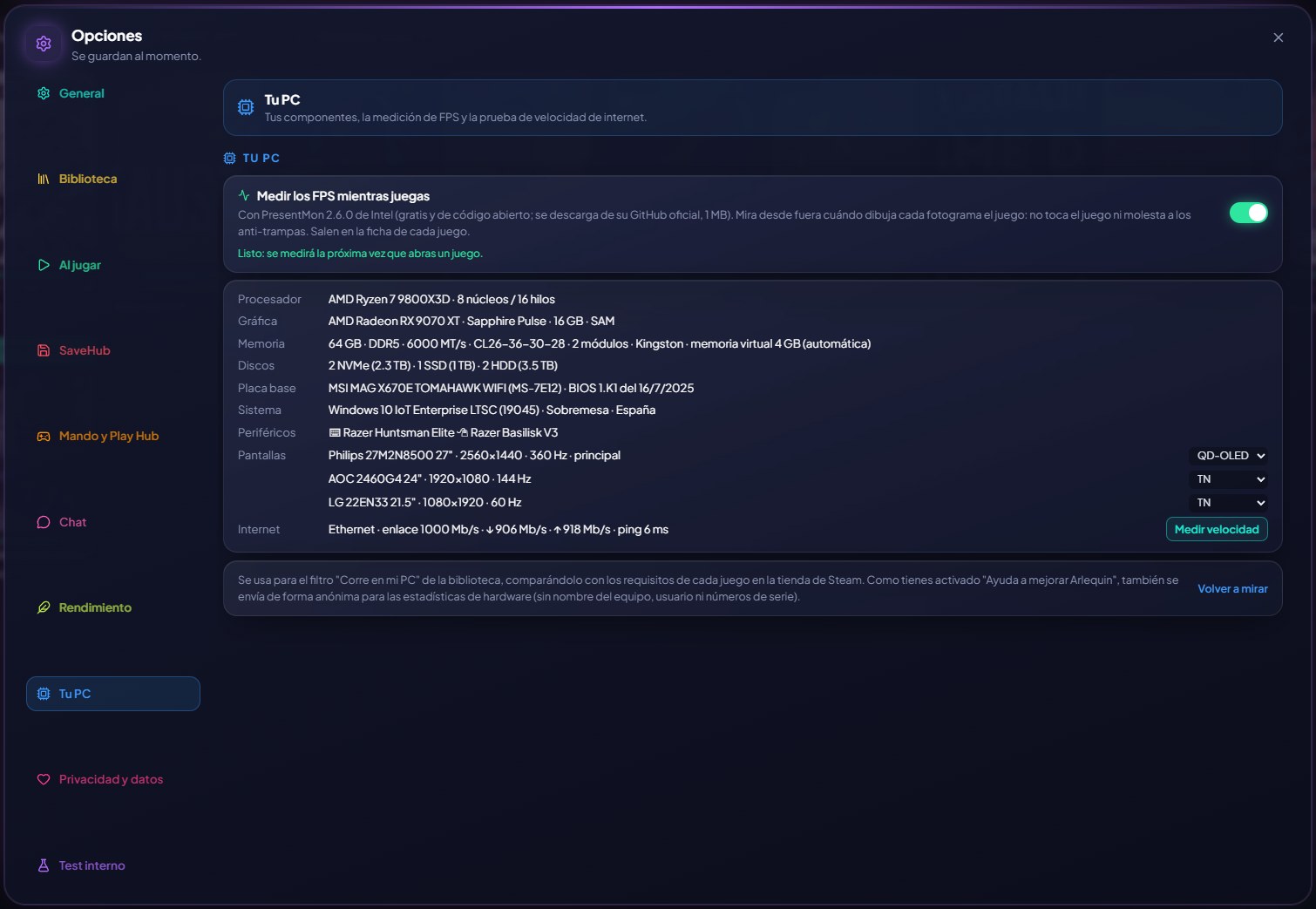
GameHub shows your CPU, your graphics card, your memory (speed, latency and modules), your drives, your screens with their refresh rate, your keyboard and mouse, and your internet speed with a test that takes about 25 seconds.
And it warns you about what often gets left switched off: if your memory runs slower than it says on the box because the XMP profile (EXPO on AMD DDR5) is off in the BIOS, or if your PC supports Resizable BAR (Smart Access Memory on AMD) and it's disabled. Both give you free FPS in many games, and it tells you what they're called in each brand's BIOS.
It also shows your motherboard with its BIOS version and date and who made your graphics card (Sapphire, ASUS, MSI…), and warns you if Windows corrects hardware errors (WHEA) or the graphics driver hangs while you play or during a test: usually a sign of an unstable overclock.
How to use it
- Options → Your PC.
- “Test speed” for the internet test (the automatic one, once a month, isn't run on mobile data).
- The internet test takes less time (about 20 seconds) and has a “Stop” button.
Give it a try?
⬇ Direct download 🛍️ Download from Microsoft StoreWindows 10 and 11 (64-bit) · Free · Updates itself