Your real FPS
Measures FPS while you play, without touching the game, and tells you what limits you.
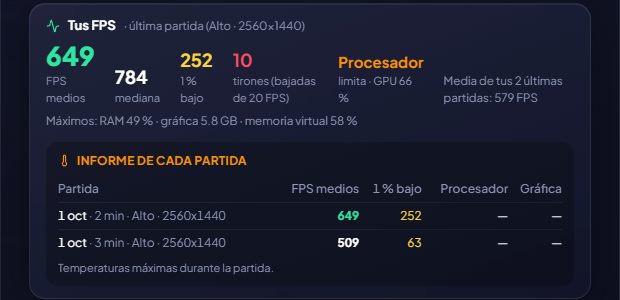
With PresentMon, a free and open-source tool from Intel, GameHub watches from outside when the game draws each frame: it doesn't inject anything, so it doesn't bother anti-cheats. When you close the game it keeps a summary: average FPS, median, 1% low (how smooth it runs) and stutters.
It notes your graphics settings for that session (quality, resolution, DLSS/FSR, frame generation, ray tracing, VSync, FPS limit) and tells you what limits your performance: the GPU, the CPU or an FPS cap (if you were capped by VSync or by a game or driver limit, you'll see “Capped” instead of blaming the CPU). Plus the RAM, graphics memory and virtual memory the game used, in case you're running short.
I've checked that it measures correctly: with an animation running at exactly 360 FPS, GameHub read 358.8. And if you want to see them while you play, put them on the HUD.
In the report for each session (ArlequinPro), besides the CPU and GPU temperature, the RAM’s too, only if its sensor really measures it.
How to use it
- Turn it on in the welcome screen or in Options → Your PC (it's optional). Windows asks for permission once and it starts measuring after you sign out or restart.
- Play for a while and close the game: you'll see it on its page, under “Your FPS”.
Give it a try?
⬇ Direct download 🛍️ Download from Microsoft StoreWindows 10 and 11 (64-bit) · Free · Updates itself