Built by playing, all together
GameHub doesn't copy other people's databases: its own is built from what the program finds out on the PCs of the people who use it, anonymously and only if you want.
A database that grows as you play
To know where each game keeps its saves, what is a game and what isn't, or how many FPS it gets on each graphics card, GameHub is building it from scratch.
What your PC already knows
GameHub reads what the stores keep on your PC (for example, Steam's cloud rules) and looks for each game's folder.
It learns as you play
If it doesn't know where a game saves, it watches which files it writes while you play and learns the save folder.
You share it (if you want)
With “Help improve Arlequin”, those paths, your hardware and your FPS are sent anonymously: never your saves, your username or your passwords.
It's reviewed and published
What comes in is reviewed before it goes into the public database, which GameHub downloads on its own when there's a new version.
Everyone wins
Games are found on their own on more PCs and FPS estimates get more accurate.
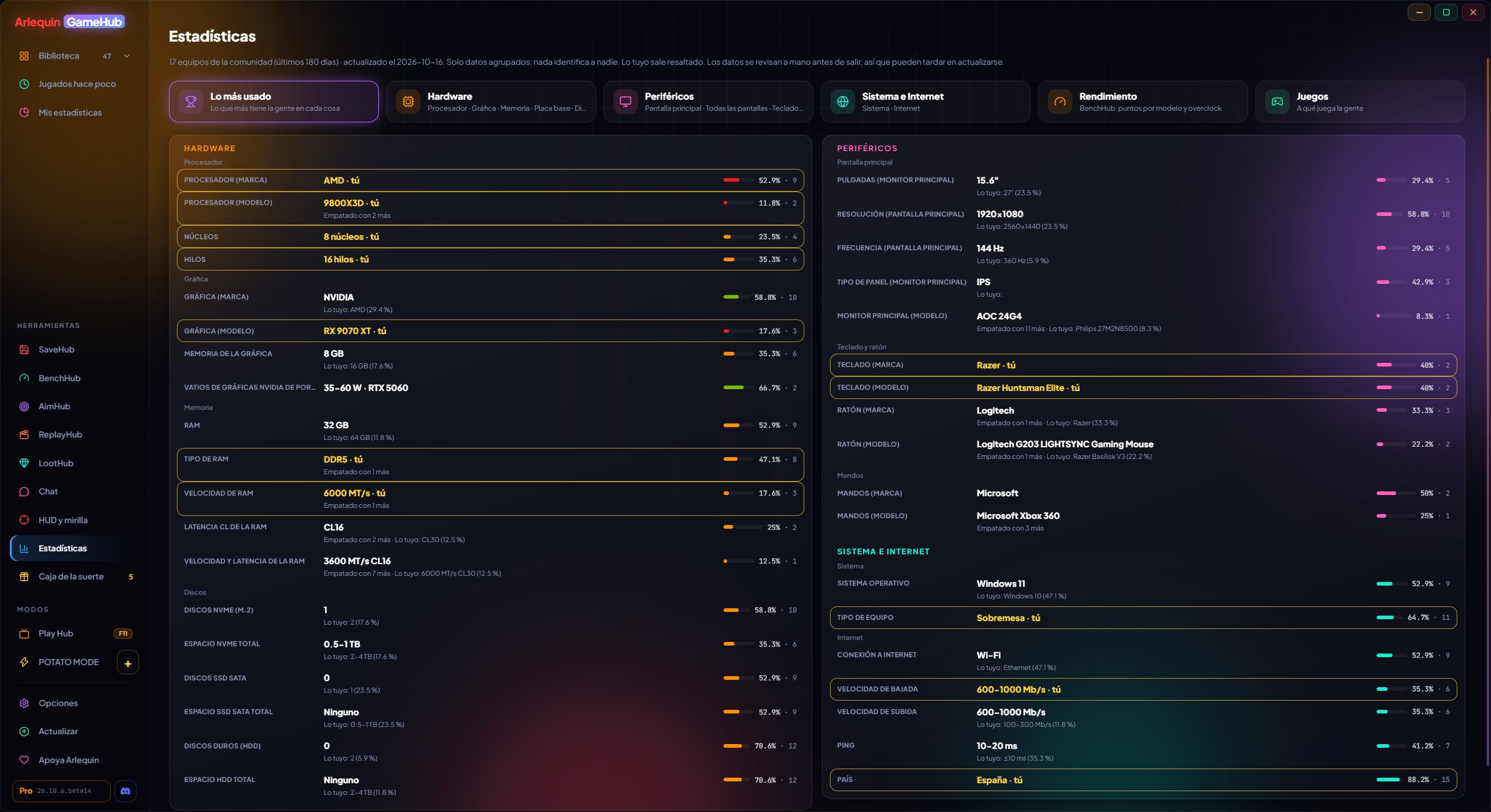
Community statistics
Which graphics cards, CPUs, screens and peripherals the people who play with GameHub use.
Like the Steam hardware survey, but more detailed: RAM speed and latency, monitor panel type and size, keyboard and mouse models, internet speed, virtual memory… All in percentages, with nothing that identifies anyone, in each brand's colours, with CPUs and graphics cards sorted by gaming performance and your own highlighted so you can compare.
They're worked out from what users share. They're visible to those who share their hardware or have ArlequinPro.
With "Most used" at a glance, controllers and all screens (main and secondary), motherboard, graphics card maker, RAM profile and a Performance tab with BenchHub points by model, with or without overclock.
How to use it
- In the sidebar, Tools → “Statistics”.
- You can also filter by where GameHub was downloaded from (Microsoft Store or the website).
- A “Drives (model)” card with the brand, model and size of each drive, and RAM at stock and with OC shown separately.
Estimated FPS for your PC
How many FPS a game will get on a PC like yours, before you play it.
With the FPS players measure (and the graphics settings and screen they were playing with), GameHub works out how many FPS each game gets on PCs similar to yours, at each quality (Low, Medium, High and Ultra), and whether the GPU or the CPU is holding you back. You see them on the game's page.
They need players: while there's little data for a game, the estimate comes from its Steam requirements and is approximate. The community ones are visible to those who share their sessions or have ArlequinPro.
How to use it
- Measure your FPS (Options → Your PC) and share your sessions.
Your data, your choice
What's shared is anonymous, optional and chosen by you, metric by metric.
With “Help improve Arlequin” on, GameHub anonymously shares what helps everyone: where games save (paths like Documents/My Games/Game), your PC's hardware and, if you measure FPS, the summary of your sessions. Never your saves, your username, your passwords or serial numbers.
You choose one by one what you share (paths, hardware, screens, keyboard and mouse, internet, country, sessions). You always see your own data; what comes from community data (statistics and estimated FPS) is visible to those who share that metric or have ArlequinPro.
How to use it
- Options → Privacy and data.
- All the details in the privacy policy.
Join the community
⬇ Direct download 🛍️ Download from Microsoft StoreWindows 10 and 11 (64-bit) · Free · Updates itself